

Finding the Perfect IT Service Desk Provider
Why IT Service Desk Outsourcing Is a Critical Decision for Regulated Businesses
IT service desk outsourcing means hiring an external provider to handle your employees' technical support — from password resets to complex system issues — instead of managing it in-house.
Is it right for your business? Here's the short answer:
Your Situation Likely Best Fit Limited IT budget, need 24/7 coverage Outsourcing Heavy compliance requirements (HIPAA, CMMC) Outsource with caution — vet providers carefully IT is core to your daily operations Consider co-managed or hybrid model In-house team is stretched thin Outsourcing or co-managed Need specialized skills you can't hire for Outsourcing
The global IT help desk outsourcing market was valued at $11.2 billion in 2023 and is projected to nearly double to $22.8 billion by 2030. That growth reflects a real shift — more organizations are realizing that running a 24/7, fully staffed help desk in-house is expensive, hard to scale, and difficult to keep compliant.
But outsourcing isn't without risk. The wrong provider can mean slower response times, security gaps, and employees who feel like they're talking to strangers every time they call for help.
For leaders in healthcare, defense, or finance, the stakes are even higher. A service desk that mishandles data can trigger a HIPAA violation, a CMMC audit failure, or a costly breach — none of which are recoverable with a simple refund.
This guide will help you evaluate your options clearly, so you can make a confident decision.
I'm Michael Gaigelas II, and I've spent years helping organizations in regulated industries navigate IT service desk outsourcing alongside compliance frameworks like CMMC 2.0, HIPAA, and ISO 27001. At Compliance Cybersecurity Solutions, I've seen how the right outsourcing strategy can cut costs by up to 50% while actually strengthening your security posture — and how the wrong one can create serious exposure.
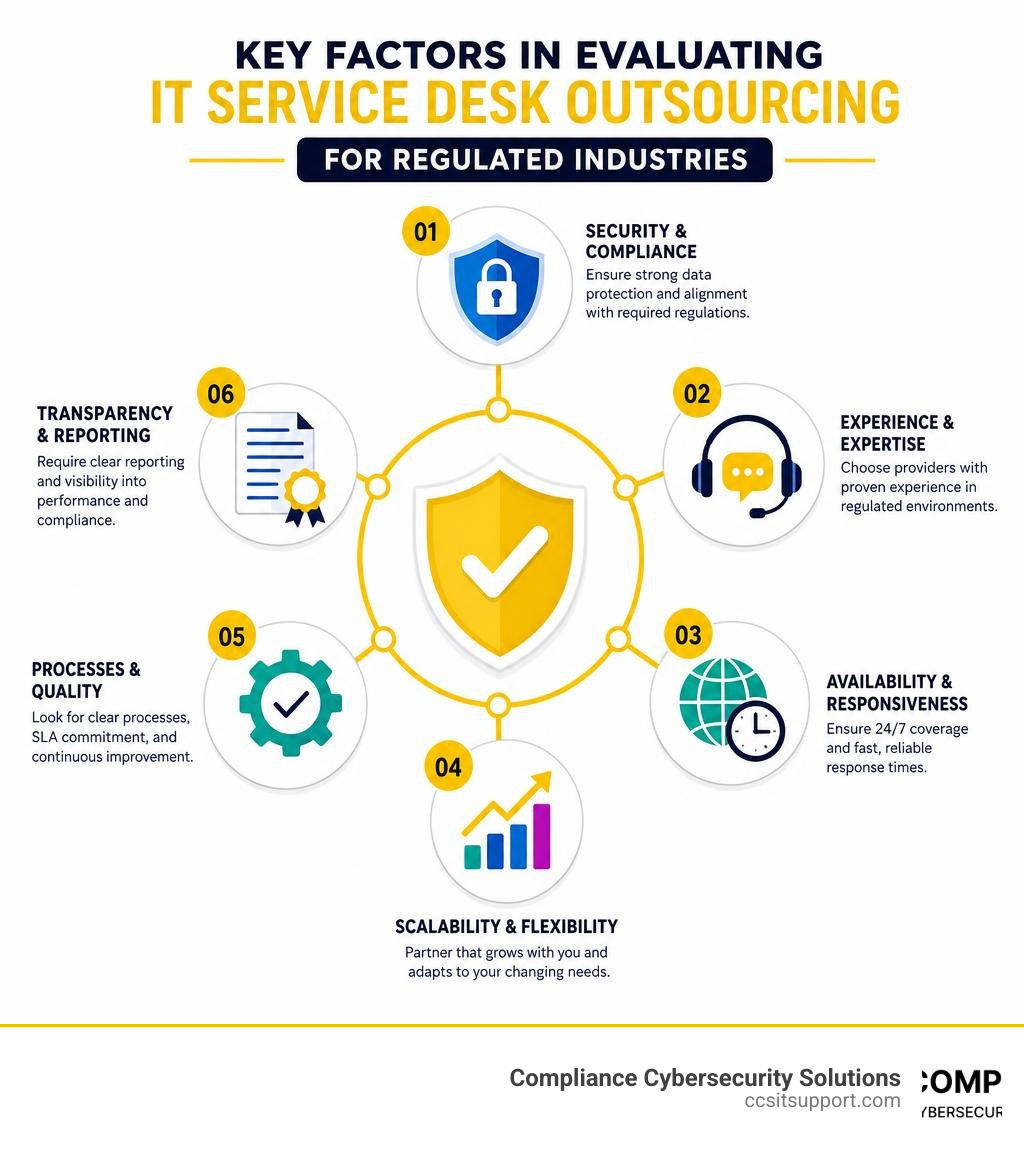
Evaluating the Pros and Cons of IT Service Desk Outsourcing
When you run a business in Florida—whether you are managing a medical practice in Fort Lauderdale, a defense contracting firm near Pompano Beach, or a financial services firm in Tampa—your technology is your lifeline. Deciding how to support that technology is a massive operational crossroads.
Should you build an internal team, or is it time to look at it service desk outsourcing? Let’s break down the real-world advantages and disadvantages of each path.
The Major Pros of Outsourcing Your IT Help Desk
Substantial Cost Savings: According to industry data, 68% of organizations that outsource their IT help desk report direct cost savings of 20% to 40% compared to maintaining an equivalent in-house operation. When you keep your help desk in-house, you aren't just paying salaries. You are paying for benefits, office space, specialized management, expensive ITSM software licenses, and ongoing training.
True 24/7/365 Availability: Technology doesn't sleep, and it certainly doesn't wait for Monday morning to break down. Providing round-the-clock support with an in-house team requires at least five to six full-time employees to cover shifts, holidays, and sick leave. An outsourced service desk gives you access to "follow-the-sun" support models, ensuring a real human is always ready to help your team, whether it is 2 PM in Fort Lauderdale or 2 AM on a holiday weekend.
Access to Specialized Skills: A single in-house technician can only know so much. In contrast, an outsourced provider gives you access to a deep bench of specialists. According to a recent survey, 47% of companies cite a lack of in-house expertise as their primary reason for outsourcing. If you run into a rare network anomaly or a complex cloud integration issue, an outsourced provider can immediately loop in a Tier 3 engineer who has solved that exact problem a hundred times before.
Better Service Quality and Efficiency: Because outsourced providers live and breathe support, they optimize every workflow. While in-house teams often get bogged down in administrative side-quests, outsourced desks maintain a laser focus on resolving issues. In fact, organizations utilizing outsourced help desks achieve an average first-contact resolution (FCR) rate of 72%, compared to just 58% for internal teams.
Scale on Demand: If your business experiences seasonal surges—common in Florida's tourism, retail, and financial sectors—you don't have to worry about being short-handed or over-hiring. Outsourcing allows you to scale support capacity up or down seamlessly.
The Cons of Outsourcing Your IT Help Desk
Risk of Service Quality Slippage: Some low-cost outsourcing providers operate on razor-thin margins. To stay profitable, they may push their technicians to resolve tickets as quickly as possible rather than as thoroughly as possible. This "just good enough" service approach can leave your employees feeling rushed and frustrated.
Organizational and Cultural Disconnect: An external team doesn't naturally know your company's culture, jargon, or unique operational quirks. If a major system outage occurs, an outsourced provider might treat it as "just another high-priority ticket," lacking the emotional investment and deep business context that an internal employee would have.
The "Black Box" Feeling: If your provider doesn't offer transparent reporting, your IT support can quickly feel like a black box. You send tickets in, they eventually get solved, but you have no real visibility into recurring issues or overall user sentiment.
Staff Rotation and Loss of Continuity: In high-turnover outsourcing call centers, your employees might talk to a different technician every time they reach out. This constant rotation makes it incredibly difficult to build trust and personal relationships.
To help you visualize these trade-offs, we’ve put together a direct comparison of what you can expect from each model:
Cost and Benefit Comparison: In-House vs. Outsourced
Feature / Metric In-House Help Desk Outsourced Service Desk Average Cost High (Salaries, benefits, tools, overhead) Predictable (Flat monthly or per-user fee) Availability Typically limited to business hours 24/7/365 coverage First-Contact Resolution Average 58% Average 72% Access to Specialists Limited to the skills of your local hires Unlimited access to Tier 1 through Tier 3 experts Scalability Slow (Requires hiring, onboarding, training) Instant (Adjustable based on business demand) Cultural Alignment High (Deep understanding of your business) Variable (Requires careful onboarding and playbook creation) Primary Focus Reactive troubleshooting + internal projects Structured incident management and continuous improvement
If you want to dive deeper into how modern, structured support models operate, you can read more about our approach to IT Service Desk Services.
For businesses located in specific regions of Florida, local market dynamics also play a role. Whether you are looking for local support in South Florida, near Pompano Beach, or extending your operations across the state to Tampa, finding a provider that understands the regional business landscape is essential to bridging any geographical gaps.
Navigating the Risks of Outsourced IT Support
It is completely normal to feel a bit anxious about handing the keys to your IT environment over to an outside partner. After all, your data, your systems, and your employees' daily productivity are on the line.
Let's look at the three most common risks of outsourcing and, more importantly, how we can mitigate them.

The Risk of Losing Control and Tacit Knowledge
When an internal IT person leaves your company, a lot of "tacit knowledge" - the unwritten rules of how your systems work, who prefers which software, and how to bypass that one finicky printer - goes out the door with them. If you outsource, there is a fear that this knowledge will be locked away in the provider's database, leaving you entirely dependent on them.
The Mitigation: We prevent this by insisting on a rigorous documentation culture. Every process, configuration, and workflow must be documented in a shared, secure knowledge base that you own.
The Risk of a Negative Customer/Employee Experience
If your employees have to wait on hold for hours or deal with unhelpful, script-reading agents, their satisfaction will plummet. A bad support experience directly impacts employee morale and productivity.
The Mitigation: Look for providers that offer warm handoffs, personalized support playbooks, and sentiment analysis. Modern help desk platforms use advanced tools to analyze the tone of an employee's chat or email, allowing managers to intervene before a frustrating interaction turns into a bad review.
The Risk of Organizational Disconnect
When a major incident occurs - such as a critical server going down - an external help desk can sometimes feel cold and detached. They might log the ticket and tell you they have four hours to respond under their SLA, while your business is actively losing thousands of dollars per minute.
The Mitigation: This is why we advocate for a partnership model rather than a transactional vendor model. Your provider should understand your business operations inside and out, knowing exactly which systems are critical to your revenue and daily workflow.
Maintaining Control Over Your IT Service Desk Outsourcing Processes
To ensure you never feel like you've lost control of your IT support, you must establish clear governance and integrate your systems seamlessly from day one.
A successful outsourcing arrangement should never feel like a black box. Instead, it should feel like an extension of your own team. This starts with how tickets are tracked and managed.
If your provider insists on using a closed, proprietary system that you can't access, run away. You should have full, real-time visibility into your IT Support Ticket System to monitor ticket volumes, response times, and resolution paths.
By utilizing a transparent, modern IT Service Desk Ticketing System, you can easily track performance metrics, jump into active tickets if necessary, and ensure that your provider is living up to their promises.
Protecting Security and Compliance in Regulated Industries
For businesses operating in regulated sectors like healthcare (HIPAA), defense contracting (CMMC), or financial services (PCI DSS, SEC regulations), outsourcing IT support isn't just an operational decision - it is a compliance decision. For example, healthcare organizations should ensure outsourced support procedures align with the HHS HIPAA Security Rule guidance when electronic protected health information may be involved.
If an outsourced technician mishandles a password reset or accesses sensitive data over an unsecured connection, your business is ultimately liable for the compliance violation.
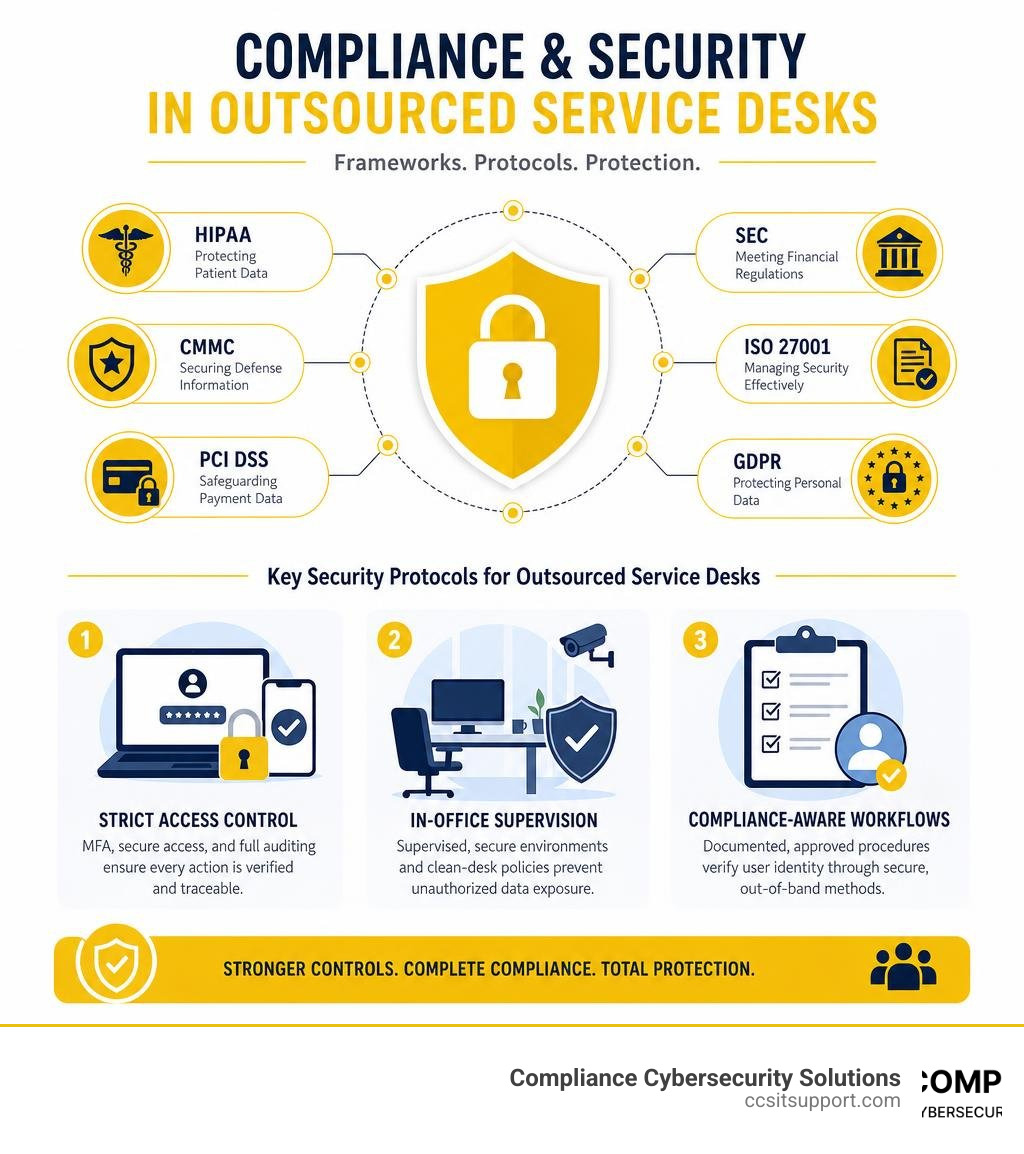
When evaluating an outsourcing partner for a regulated business, you must look for the following security controls:
Strict Access Control: Technicians must use multi-factor authentication (MFA) and secure, encrypted remote access tools to connect to your systems. Every action they take must be fully audited and logged.
In-Office Supervision: For highly regulated environments, work-from-home support models can pose a significant security risk. Look for providers who utilize supervised, secure office environments with strict clean-desk policies to prevent unauthorized data exposure.
Compliance-Aware Workflows: The service desk must have documented, compliance-approved procedures for identity verification. A technician should never reset a password or grant access to a system without verifying the user's identity through a secure, out-of-band method.
Industry Certifications: Ensure your provider holds relevant security certifications, such as ISO 27001 or SOC 2 Type II, and can actively align their support workflows with your specific regulatory requirements.
At Compliance Cybersecurity Solutions, we specialize in bridging the gap between daily IT support and strict regulatory standards. If you are navigating these complex requirements, our team can help you build a secure foundation through IT Compliance Consulting and tailored Small Business Cyber Security Consulting.
Hidden Costs and SLA Management in Outsourcing Contracts
"The price you see is the price you pay." It’s a lovely sentiment, but in IT outsourcing contracts, it is rarely the whole story. If you aren't careful during contract negotiations, you can easily end up with a mountain of unexpected fees.
Common Hidden Costs to Watch Out For
Out-of-Scope Fees: Many low-cost contracts only cover basic, routine tasks. If an employee needs help setting up a complex new software application or troubleshooting a unique hardware issue, the provider may charge you a hefty hourly rate for "out-of-scope" support.
Onboarding and Transition Costs: Transitioning your support from an in-house team or a previous vendor to a new provider takes time and effort. Providers often charge a setup fee to cover the cost of auditing your systems, creating playbooks, and training their staff on your environment.
Integration Fees: If you want the provider’s help desk tools to integrate with your existing CRM, HR platforms, or internal ticketing systems, you may face additional integration and software licensing fees.
After-Hours Premiums: While a provider might advertise "24/7 support," their base contract may only cover standard business hours. Support requests handled on weekends, holidays, or late at night might incur additional surcharges.
Designing SLAs That Actually Drive Quality
Service Level Agreements (SLAs) are the heart of any outsourcing contract. However, many organizations make the mistake of focusing solely on "speed" metrics, such as how fast a technician answers the phone.
While speed is important, it doesn't tell you if the issue was actually fixed correctly. If an agent answers your call in 10 seconds but has to transfer you three times and ultimately fails to solve your problem, your SLA might look great on paper, but your employee's experience is miserable.
To prevent this, you should structure your SLAs around outcomes rather than just activities. Focus on metrics like:
First-Contact Resolution (FCR): The percentage of tickets resolved during the very first interaction, without needing a call-back or escalation.
Mean Time to Resolution (MTTR): The average time it takes from the moment a ticket is opened to the moment the issue is completely resolved.
User Satisfaction (CSAT) Scores: Direct feedback gathered from your employees immediately after a ticket is closed.
Backlog Health: Ensuring that open, unresolved tickets aren't piling up week after week.

How to Choose the Right Outsourcing Model for Your Business
No two businesses are identical, which means there is no single "perfect" outsourcing model. The right approach depends entirely on your internal resources, your budget, and how critical IT is to your daily operations.
Generally, you can choose from three primary models:
1. Fully Outsourced IT Service Desk
In this model, the external provider handles everything. They are your single point of contact for all technical issues, managing Tier 1 through Tier 3 support. This is highly cost-effective for small to mid-sized businesses that want to eliminate the overhead of running an internal IT department entirely.
2. Co-Managed IT Help Desk
If you already have a small, dedicated internal IT team, a co-managed model is often the sweet spot. Your internal staff can focus on strategic projects, network security, and high-level business initiatives, while the outsourced provider handles the repetitive, high-volume Tier 1 support requests like password resets and basic software troubleshooting.
This model is particularly popular in highly demanding sectors. For example, financial firms often use co-managed support to maintain tight internal control over sensitive databases while offloading daily user issues. You can read more about how this applies to financial institutions in our guide to Managed IT for Finance.
3. Hybrid or Function-Specific Outsourcing
With a hybrid model, you outsource only specific functions or time blocks. For example, you might handle all support in-house during normal business hours but outsource your after-hours, weekend, and holiday coverage to ensure your team has 24/7 protection without burning out your internal staff.
To help you choose, you can also look into modern, automated support solutions. Some advanced providers combine human expertise with cutting-edge AI integrations to dramatically boost efficiency, streamlining support workflows and ensuring rapid resolution times.
Determining the Scope of Your IT Service Desk Outsourcing Initiative
If you decide to move forward with outsourcing, your next step is defining exactly what the provider will handle. IT support is traditionally broken down into distinct tiers:
Tier 0 (Self-Service): Empowering your employees to solve basic issues on their own through automated chatbots, password reset portals, and an easy-to-use knowledge base.
Tier 1 (Basic Support): Handling routine, everyday requests. This includes user account creation, basic software walkthroughs, printer connectivity issues, and simple troubleshooting.
Tier 2 (Advanced Troubleshooting): Resolving more complex technical issues that require deeper system access, such as diagnosing network connectivity problems, troubleshooting software errors, or configuring virtual private networks (VPNs).
Tier 3 (Expert-Level Engineering): Addressing critical, system-level issues. This tier involves senior network engineers, cloud architects, and cybersecurity specialists who can resolve major infrastructure outages or handle complex system migrations.
By clearly defining which tiers you want to outsource and which ones (if any) you want to keep in-house, you can build a highly efficient, scalable support structure that aligns perfectly with your business goals.
Frequently Asked Questions About IT Service Desk Outsourcing
What is the difference between an IT help desk and an IT service desk?
While the terms are often used interchangeably, they actually have different operational focuses:
An IT Help Desk is primarily reactive and problem-focused. Its main goal is to provide users with a single point of contact to get quick fixes for immediate technical issues (like a broken printer or a forgotten password).
An IT Service Desk is broader and more strategic. It is built on an Information Technology Service Management (ITSM) framework and focuses on the overall delivery of IT services. A service desk manages not just daily incidents, but also change management, asset lifecycles, and aligning your technology strategy with your long-term business goals.
How do we prevent a drop in employee satisfaction when outsourcing?
The key to keeping your employees happy during a transition is active change management and clear communication.
Communicate Early: Let your team know why you are making the change and how it will benefit them (e.g., faster response times and 24/7 availability).
Provide Clear Instructions: Make sure everyone knows exactly how to reach the new service desk—whether it is through a dedicated portal, email, phone, or direct messaging tools like Slack or Microsoft Teams.
Monitor Sentiment: Work with a provider that uses real-time user sentiment analysis and post-ticket feedback surveys to quickly identify and resolve any friction points.
How long does the transition to an outsourced service desk typically take?
For most small to mid-sized businesses, a standard onboarding and transition timeline takes about two to four weeks. During this period, the provider will audit your IT environment, capture and document key workflows, integrate ticketing systems, and train their technicians on your specific business rules. For highly complex enterprise environments or heavily regulated industries requiring deep compliance configurations, the transition can take slightly longer to ensure a seamless, zero-downtime handoff.
Conclusion: Making the Strategic Move with CCS
Choosing the right IT support model is a major strategic decision. it service desk outsourcing offers an incredible opportunity to slash your operational overhead, gain instant access to specialized technical skills, and provide your team with reliable, round-the-clock support.
But as we’ve discussed, outsourcing is not a decision you should make blindly—especially if you operate in a regulated industry where security and compliance are non-negotiable.
At Compliance Cybersecurity Solutions (CCS), we do things differently. Based right here in Fort Lauderdale, Florida, we don't believe in the "one-size-fits-all, black-box" approach to IT support. We specialize in providing highly secure, compliance-aligned IT service desk and cybersecurity solutions tailored specifically for businesses in healthcare, defense, and finance.
We combine the cost savings and scalability of modern outsourcing with the deep security protocols, strict access controls, and compliance expertise your business needs to thrive. Our local, certified engineers are dedicated to protecting your uptime, your productivity, and your reputation.
Ready to transform your IT support from a source of daily stress into a secure, competitive advantage? Let’s talk.