Operations and Support: Mastering the IT Helpdesk Ticketing System
Why IT Helpdesk Support Is the Backbone of Business Operations
IT helpdesk support is the first line of defense when technology breaks down — and in regulated industries like healthcare, defense, and finance, a slow or broken support system doesn't just frustrate employees. It creates compliance risk, security gaps, and real financial exposure.
Here's what IT helpdesk support is, at a glance:
What It Is What It Does Why It Matters A centralized support function Resolves technical issues for end users Keeps employees productive and systems running A ticketing and triage system Logs, routes, and tracks every support request Creates accountability and audit trails A compliance touchpoint Enforces access controls and security policies Reduces risk under HIPAA, CMMC, and SOC 2 A scalable service model Supports remote, hybrid, and on-site teams Adapts as your organization grows
When IT issues pile up and employees can't get help fast, productivity stalls. For organizations in regulated industries, the stakes are even higher — an unresolved incident can trigger a compliance violation or open a security gap that auditors will flag.
This guide walks you through everything you need to know: how helpdesk support is structured, what modern tools and automation can do, and how to choose the right solution for your organization.
I'm Michael Gaigelas II, and I've spent my career helping businesses in healthcare, defense, and finance navigate complex compliance frameworks — including CMMC 2.0, HIPAA, and SOC 2 — while building IT helpdesk support operations that are both efficient and audit-ready. If you're an overwhelmed leader trying to reduce risk without blowing your IT budget, this guide was written for you.
Understanding IT Helpdesk Support and Its Business Importance

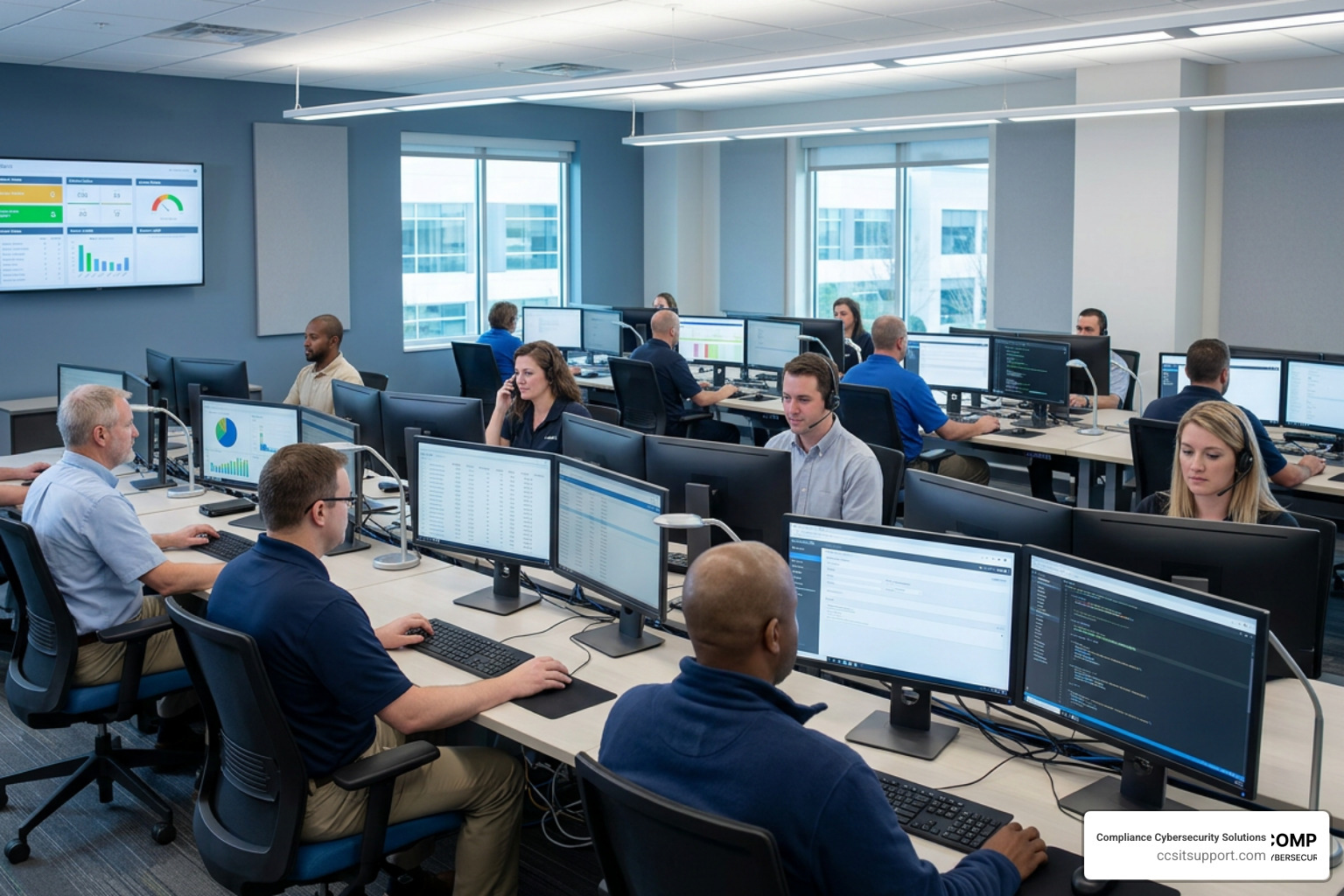
At its core, IT helpdesk support serves as the Single Point of Contact (SPOC) between an organization's IT infrastructure and its end users. When an employee encounters a technical roadblock — whether it is a locked account, a failing application, or a suspicious email — they do not need to guess which systems administrator or security engineer to contact. They reach out to the helpdesk.
This centralized approach is vital for maintaining end-user productivity. Instead of wasting valuable hours trying to self-diagnose complex computer issues, employees can hand off their technical problems to dedicated specialists. Behind the scenes, the helpdesk relies on structured incident management to log, track, and resolve these issues systematically.
Furthermore, robust helpdesk support is a cornerstone of business continuity. By proactively monitoring trends in incoming tickets, support teams can identify systemic infrastructure failures (such as a failing network switch or an unstable software update) before they result in widespread, costly downtime.
To explore how these workflows integrate with broader organizational goals, you can read more about our comprehensive IT Service Desk Services.
Core Responsibilities of IT Helpdesk Support Teams
A high-performing helpdesk team manages a diverse array of day-to-day technical challenges. Their primary responsibilities include:
Troubleshooting & Diagnostics: Identifying the root cause of operating system errors, hardware malfunctions, and software crashes.
Password Resets & Credential Management: Securely verifying user identities and resetting access credentials to minimize lock-out times while preventing unauthorized access.
Software Installation & Updates: Deploying and configuring line-of-business applications while ensuring compliance with software licensing agreements.
Hardware Diagnostics: Assessing the health of laptops, desktops, mobile devices, and peripherals, and coordinating repairs or replacements.
User Onboarding & Offboarding: Provisioning new accounts, setting up secure workstations, and rapidly deprovisioning access when employees depart to protect sensitive organizational data.
Help Desk vs. Service Desk vs. ITSM
While these terms are frequently used interchangeably in casual conversation, they represent distinct tiers of IT operations and maturity within the ITIL (Information Technology Infrastructure Library) framework:
Concept Primary Focus Operational Nature ITIL Alignment Help Desk Fixing immediate technical issues for end users (tactical). Reactive (break-fix support). Part of the Service Operation lifecycle. Service Desk Managing service requests, access, and overall IT service delivery. User-centric and process-driven. Integrates incident, request, and change management. IT Service Management (ITSM) Aligning IT services with strategic business goals and compliance requirements. Strategic and proactive. Covers the entire service lifecycle from design to continuous improvement.
Understanding these distinctions helps organizations move from a purely reactive, chaotic "firefighting" mode to a structured, proactive strategy that supports long-term business growth.
The Architecture of Support: Tiers and Ticketing Workflows
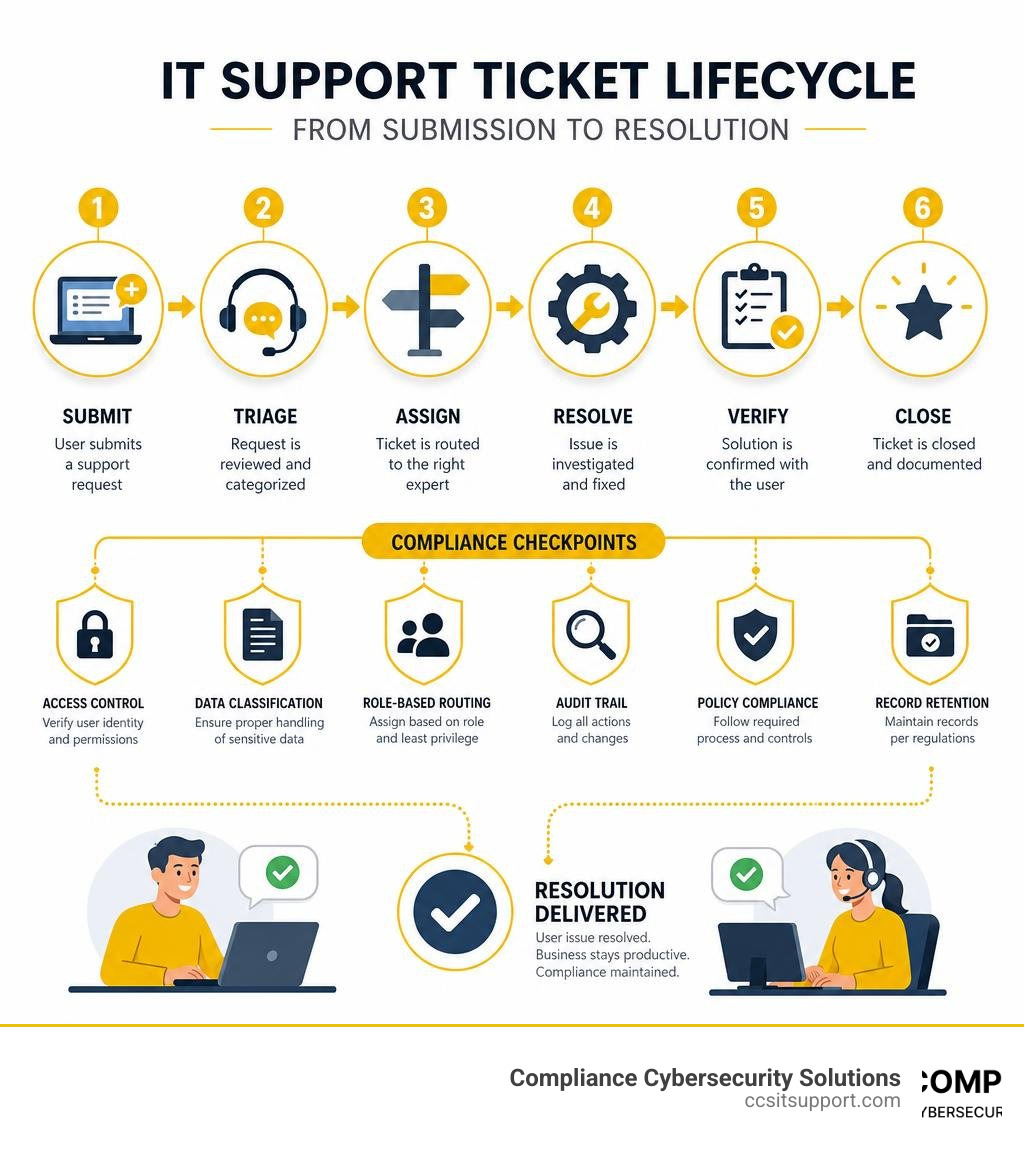
An efficient IT helpdesk support operation depends on structured escalation paths, intelligent ticket routing, and rigorous incident triage. Without these workflows, support requests quickly pile up in a single, disorganized inbox, leaving high-priority security and operational incidents buried beneath routine password reset requests.
To prevent this bottleneck, modern organizations implement a structured IT Service Desk Ticketing System to automate ticket ingestion, categorization, and prioritization.
Tier 1, Tier 2, and Tier 3 Support Structures
To maximize efficiency, technical support is organized into specialized tiers. This structure ensures that highly paid systems engineers are not distracted by basic tasks, while entry-level technicians are not overwhelmed by complex architectural issues.
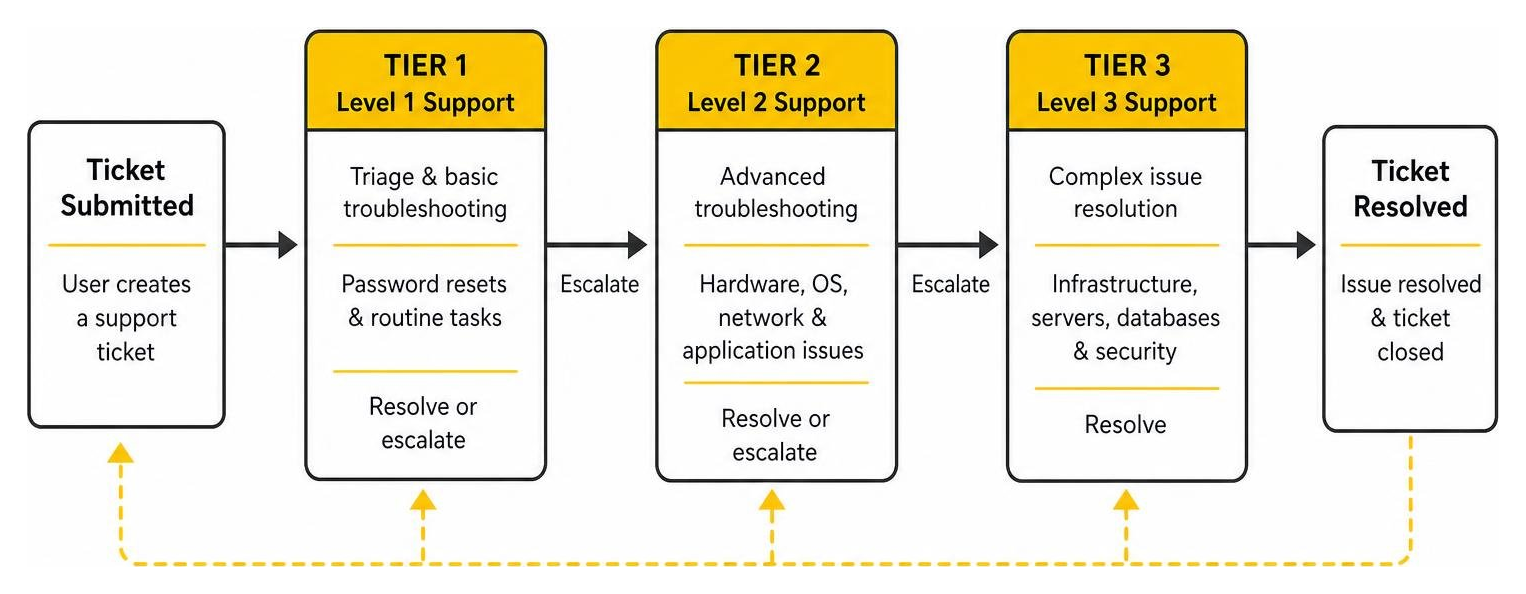
Tier 1 (Level 1 Support & Triage): The frontline of defense. Tier 1 technicians handle initial ticket intake, basic troubleshooting, password resets, and routine software configurations. They focus on resolving simple issues during the first contact. If an issue is too complex, they document the technical details and escalate it.
Tier 2 (Level 2 Desktop & Field Support): This tier handles more advanced troubleshooting that requires deeper technical knowledge or hands-on intervention. Tier 2 technicians deal with complex operating system issues, hardware failures, local network connectivity problems, and specialized software errors.
Tier 3 (Level 3 Systems & Network Engineering): The highest escalation tier. Tier 3 is composed of senior engineers, database administrators, and cybersecurity specialists. They address critical infrastructure outages, server failures, complex database corruptions, and advanced security incidents.
Integrating Ticketing Systems with CRMs and Monitoring Tools
A helpdesk ticketing system should never exist in a vacuum. To maximize operational efficiency, it must integrate seamlessly with other core business and IT management platforms.
By leveraging API integrations, organizations can connect their ticketing systems with Customer Relationship Management (CRM) platforms, network monitoring tools, and IT asset management systems. For instance, when a network monitoring tool detects that a critical server has run out of disk space, it can automatically generate a high-priority ticket in the helpdesk platform before users even experience a slowdown.
This unified workflow provides technicians with immediate context, showing the user’s device history, warranty status, and compliance profile directly within the ticket interface. To see how these integrations fit together, check out our Service Desk Tools List for an overview of industry-standard tools.
The Strategic Value of Modern IT Helpdesk Support

Modern IT helpdesk support has evolved far beyond the traditional, reactive "break-fix" model. Today, it serves as a strategic asset that leverages cloud-based scalability, artificial intelligence, and sophisticated automation to drive organizational efficiency and secure a distributed workforce.
Leveraging AI, Automation, and Self-Service Portals
The integration of AI and automation into helpdesk platforms has revolutionized response and resolution times.
60% quicker response times are achieved when organizations implement automation and AI in their helpdesk ticketing systems to categorize, tag, and route tickets instantly.
An AI Agent can resolve up to 73% of routine questions in live chat (such as "How do I connect to the office printer?" or "Where is the VPN guide?") before they ever escalate into a manual ticket for a human agent.
35% faster ticket resolution is realized by teams that utilize streamlined multi-channel communications, such as HelpDesk by Text.
Automation rules can easily handle 2,000 tickets a month and perform over 7,000 automated actions (such as auto-closing idle tickets, sending follow-ups, and assigning priority tags) without requiring human intervention.
Prioritization and automated tagging allow teams to resolve 100+ critical tickets within four hours.
Currently, 49% of companies provide self-service options for basic IT requests, empowering employees to find answers instantly through curated knowledge bases.
Supporting Remote, Hybrid, and Global Teams
As hybrid and remote work environments become the standard for businesses across Florida, helpdesk operations must adapt. Support teams must be fully equipped to manage remote access challenges, troubleshoot home Wi-Fi and VPN connectivity issues, and support diverse multi-platform environments (including Windows, macOS, iOS, and Android).
By utilizing cloud-based helpdesk solutions, support teams can deliver rapid, secure remote desktop control to resolve issues on a user's device regardless of where they are working. Furthermore, global operations can leverage a "follow-the-sun" support model, utilizing distributed teams to provide seamless 24/7/365 technical assistance without burning out local staff.
Overcoming Common IT Support Challenges in Regulated Industries
For organizations operating in regulated sectors like healthcare, defense, and finance, standard IT support is not enough. A standard helpdesk technician might focus solely on making a system work, occasionally bypassing security protocols (such as sharing admin credentials or disabling a firewall) just to close a ticket quickly.
At Compliance Cybersecurity Solutions, we understand that usability must never come at the expense of compliance. In regulated environments, every IT support action must align with strict regulatory frameworks, including HIPAA, CMMC, and SOC 2. To learn how we tailor these workflows for medical providers, explore our Healthcare IT Helpdesk Services.
Addressing Security and Compliance Gaps
When we design helpdesk workflows, we implement strict security controls to protect sensitive data and maintain compliance:
Data Encryption: Ensuring that all data transmitted during remote support sessions and stored within ticketing databases is fully encrypted.
Role-Based Access Control (RBAC): Restricting technician access so they can only view the specific systems and data required to resolve a assigned ticket.
Immutable Audit Logs: Automatically logging every action taken on a ticket, password reset, or remote session to provide a clear, tamper-proof trail for compliance auditors.
Compliance Alignment: Building workflows that naturally support SOC 2 Type 2, GDPR, HIPAA, and CMMC requirements, ensuring that no support action compromises threat detection or layered security.
Career Opportunities and Talent Acquisition in Florida
The demand for skilled IT support professionals who understand both technology and cybersecurity compliance is growing rapidly. For those looking to enter or advance in the field within Florida, the career outlook is highly promising:
There have been 47,000+ U.S. job listings for helpdesk technicians in the last 12 months alone.
The median annual salary for helpdesk technicians stands at $53,000, with specialized compliance-focused roles commanding higher premiums.
Employment in this sector is projected to grow to 228,000 employed technicians through 2030.
If you are a job seeker looking to build a career in this high-growth space in Florida, you can explore current local opportunities here:
Selecting and Managing Your IT Helpdesk Solution
Choosing the right IT helpdesk support model — whether you build an in-house team, purchase modern ticketing software, or partner with a managed service provider — requires a careful analysis of your operational needs, compliance requirements, and budget.
To help structure this evaluation process, organizations often rely on strategic IT Service Desk Management frameworks to align support metrics with business goals.
Choosing the Right IT Helpdesk Support Software and Partners
When evaluating helpdesk software or external support partners, businesses must choose between cloud-based and on-premise solutions. Cloud-based helpdesk solutions offer rapid deployment, automatic updates, and effortless scalability for remote teams. On-premise solutions, while requiring more maintenance overhead, provide maximum data control for organizations with highly restrictive security compliance mandates.
Key features to look for during your evaluation include customizable ticketing workflows, native integrations with your existing software stack, robust reporting analytics, and a user-friendly IT Service Desk App that allows employees to submit and track tickets easily from their mobile devices.
Understanding Pricing Models and Service Level Agreements (SLAs)
IT helpdesk support services generally follow one of two primary pricing models:
Per-User Pricing: A flat monthly fee per employee. This model is highly predictable and covers all devices and support requests associated with that user.
Per-Ticket Pricing: You pay only for the volume of support requests processed. While potentially cheaper for low-volume environments, this model can lead to unpredictable monthly costs if a major technical issue occurs.
Crucially, any support agreement must be governed by a clear Service Level Agreement (SLA). The SLA defines the expected performance standards, specifically outlining:
First Response Time: How quickly a technician will acknowledge a new ticket (e.g., under 30 minutes for critical issues).
Resolution Time: The maximum target time allowed to fully resolve an issue based on its severity tier.
Escalation Paths: Clear procedures for when and how a ticket should be escalated to senior engineers if it remains unresolved.
Frequently Asked Questions about IT Helpdesk Support
What is the difference between an IT help desk and an IT service desk?
An IT help desk is primarily tactical and reactive, focusing on resolving immediate technical issues and "break-fix" requests for end users. An IT service desk is a broader, more strategic evolution of the help desk, aligned with the ITIL framework. It is designed to be highly user-centric, managing not just incidents but also service requests, change management, and overall IT service delivery.
How does automation improve IT help desk efficiency?
Automation drives efficiency by eliminating repetitive, manual tasks. It enables up to a 60% quicker response time by automatically routing and prioritizing tickets based on pre-defined rules. It can auto-assign common issues, send automated follow-up emails, and leverage AI agents to resolve up to 73% of routine questions instantly, allowing human technicians to focus on complex, high-value technical issues.
Why is compliance critical for IT help desks in healthcare and finance?
In regulated industries, a helpdesk technician often has administrative access to systems containing sensitive Protected Health Information (PHI) or financial data. If the helpdesk does not enforce strict identity verification, role-based access controls, and data encryption, it can easily leak data or fail audits. A compliance-aligned helpdesk ensures every support action meets HIPAA, CMMC, or SOC 2 standards.
Conclusion
Mastering your IT support workflows is essential for maintaining productivity, securing your endpoints, and passing your compliance audits. For businesses in Fort Lauderdale and across Florida, managing this in-house can be an overwhelming, expensive distraction from your core mission.
At Compliance Cybersecurity Solutions, we specialize in delivering secure, compliant, and highly responsive managed IT support. We align your daily IT operations with rigorous regulatory frameworks like HIPAA and CMMC through layered security, continuous threat detection, and audit-ready documentation.
If you are ready to eliminate technical downtime and secure your business, explore our IT Service Desk Outsourcing options, or contact our team today to Secure your business with CCS IT support.