

How to Manage Your Service Desk Without Losing Your Mind
Why IT Service Desk Management Makes or Breaks Your Business Operations
IT service desk management is the practice of organizing, staffing, and continuously improving the central hub where employees get technical help — and how well you do it directly affects how fast your whole organization runs.
Here's a quick-reference summary if you need the essentials fast:
What You Need to Know Key Point What it is A structured system for receiving, routing, and resolving IT issues and requests Who it serves Employees, end users, and the business as a whole Core functions Incident management, service request fulfillment, knowledge management Key goal Minimize downtime and keep people productive Framework used Typically ITIL (Information Technology Infrastructure Library) How to measure success CSAT scores, first contact resolution rate, mean time to resolution (MTTR)
Running a service desk sounds simple on paper. In practice, it's one of the hardest things to get right — especially in regulated industries like healthcare, defense, or finance where a slow ticket response can mean a compliance failure, not just an annoyed employee.
Consider this: 82% of service professionals say customer expectations are higher than they've ever been. Your employees are also customers of your IT team. When they can't get help fast, productivity stalls — and in a regulated environment, that stall can carry real legal and financial risk.
I'm Michael Gaigelas II, and through my work guiding organizations through CMMC 2.0, HIPAA, and ISO 27001 compliance at Compliance Cybersecurity Solutions, I've seen how poor IT service desk management creates security gaps, audit failures, and unnecessary costs — and how fixing it transforms an organization's resilience.
Understanding the Core of IT Service Desk Management
At its heart, IT service desk management isn't just about resetting passwords or configuring new laptops. It is the tactical command center of your IT ecosystem. In 2026, the modern service desk acts as the primary bridge between raw technology and the human beings who rely on it to drive business outcomes.
To manage a service desk without losing your sanity, we must first build a solid foundation. This starts with understanding where the service desk fits into the broader landscape of IT support.
Feature IT Help Desk IT Service Desk IT Service Management (ITSM) Primary Focus Tactical "break-fix" troubleshooting Strategic, user-centric service delivery Overarching strategy, policies, and lifecycle Operational Style Reactive Proactive & Integrated Governance-oriented Key Framework Basic ticketing & resolution ITIL (Information Technology Infrastructure Library) Full ITIL, COBIT, or ISO 20000 Scope Resolving immediate hardware/software issues Managing incidents, service requests, changes, and assets Designing, creating, delivering, and supporting all IT services
The service desk functions as the Single Point of Contact (SPOC) for all communication between IT and the rest of the business. By centralizing all inquiries, you prevent the chaotic "shoulder-tapping" culture where employees bypass the system to ask their favorite IT person for a quick favor.
When you implement a structured IT Service Desk Ticketing System, every request is logged, categorized, prioritized, and tracked. This structure is critical for maintaining order, protecting sensitive corporate data, and ensuring that no critical security incident is mistaken for a minor glitch.
What is an IT Service Desk?
An IT service desk is a centralized support function that coordinates responses to user needs, streamlines issue resolution, and ensures smooth daily operations across an organization. It is much more than a technical call center; it is a communication hub designed to manage the entire lifecycle of user requests.
When an employee faces a technical blocker—whether it's a locked account, a suspected phishing email, or a broken VPN connection—the service desk is where they turn. By focusing on user satisfaction and business alignment, an effective service desk transforms IT from a frustrating bottleneck into an organizational accelerator.
Help Desk vs. Service Desk vs. ITSM
While people often use these terms interchangeably, they represent distinct levels of maturity and scope:
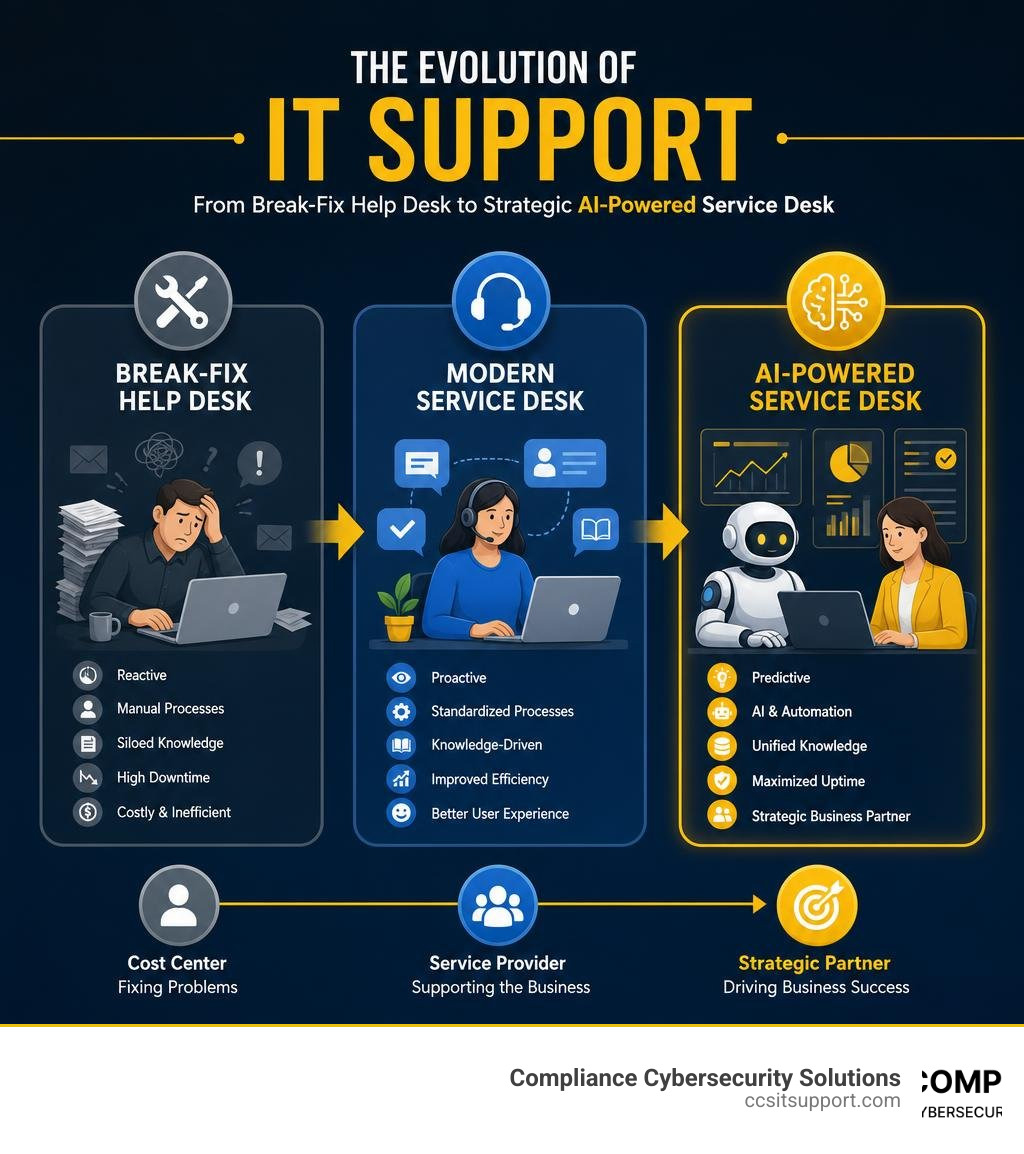
The Help Desk is tactical and reactive. Its main job is to fix things that are already broken (break-fix support). It handles Level 1 and Level 2 issues but rarely looks at the bigger picture.
The Service Desk is strategic and proactive. It manages both incidents (fixing broken things) and service requests (providing new software, onboarding employees). It is built around the ITIL framework, focusing on delivering IT as a comprehensive service.
IT Service Management (ITSM) is the entire umbrella. It includes the processes, policies, and software used to design, deliver, and manage IT services throughout their lifecycle. The service desk is the visible, operational arm of your broader ITSM strategy.
Best Practices, Maturity, and Performance Metrics
Managing a service desk successfully requires a mix of standardized processes, clear communication, and continuous evaluation. Without best practices, your support team will constantly operate in "firefighting mode," reacting to the loudest voice in the room rather than the highest business priority.

To elevate your operations, we recommend looking to international standards. The Global Best Practice Standard for Service Desk provides a phenomenal framework for assessing your service desk's maturity and alignment with business objectives. Additionally, investing in professional development, such as the Service Desk Manager v8 (SDM) | peoplecert.org certification, equips your team leaders with the necessary financial, leadership, and strategic planning skills to align IT support with corporate goals.
To keep track of everything, you must utilize a robust IT Support Ticket System to capture data, manage queues, and enforce accountability.
Core Responsibilities in IT Service Desk Management
A high-performing service desk handles several critical processes simultaneously:
Incident Logging and Management: Capturing, classifying, and resolving unexpected disruptions to restore normal service operations as quickly as possible.
Change Management: Standardizing processes to ensure that software updates, hardware replacements, and network modifications do not cause unexpected downtime or introduce security vulnerabilities.
Asset Tracking & CMDB: Maintaining an accurate repository of all IT assets—laptops, mobile devices, servers, and software licenses—to optimize costs and simplify compliance audits.
Knowledge Base Management: Storing, updating, and sharing tested solutions so technicians can resolve issues faster and users can help themselves.
The Five Stages of Service Desk Maturity
According to industry standards, service desks evolve through five distinct maturity levels:
Stage 1: Reactive: The team is overwhelmed, firefighting, and lacks documented processes. Support is inconsistent, and metrics are rarely tracked.
Stage 2: Proactive: Basic processes are defined. The team uses trend analysis to prevent recurring issues and starts tracking key SLA metrics.
Stage 3: Customer-Centric: The focus shifts to the user experience. Self-service portals are introduced, and Service Level Agreements (SLAs) are consistently met.
Stage 4: Business-Aligned: The service desk is viewed as a strategic partner. IT services are aligned directly with departmental objectives, and the desk actively supports organizational growth.
Stage 5: World-Class: The desk delivers demonstrable organizational benefits. It leverages advanced automation, AI-driven predictive insights, and Experience Level Agreements (XLAs) to maximize employee productivity and happiness.
Critical Metrics and KPIs to Track
You cannot manage what you do not measure. To keep your service desk on track, focus on these essential key performance indicators (KPIs):
Customer Satisfaction (CSAT): Gathered via short, post-resolution surveys. This is your ultimate metric for user experience.
Mean Time to Resolution (MTTR): The average time it takes to resolve an incident from the moment it is logged. Lowering MTTR directly impacts business productivity.
First Contact Resolution (FCR): The percentage of tickets resolved during the user's very first interaction. High FCR rates keep support costs low and users happy.
Ticket Volume & Trends: Tracking how many tickets come in, when they peak, and what categories they fall into helps you allocate staffing resources effectively.
Leveraging AI, Automation, and Modern Technologies
In 2026, technology is moving too fast for manual service desk management. High ticket volumes, complex hybrid work environments, and sophisticated cyber threats mean that service desks must embrace modern software and artificial intelligence to stay ahead.

When selecting and configuring tools, aligning with the Service Desk Manager (SDM) Professional Standard ensures your technology choices support a structured, compliant, and highly secure operational model.
The Impact of AI on IT Service Desk Management
Artificial intelligence has completely revolutionized how support is delivered. It is no longer just a buzzword; it is a fundamental operational layer.
Virtual Support Agents: AI-powered chatbots handle routine, low-risk requests—like password resets and software access approvals—instantly, 24/7. This frees up human technicians to focus on complex, high-value troubleshooting.
Predictive Triaging & Routing: Machine learning algorithms automatically analyze incoming tickets, categorize them, assign the correct priority level, and route them to the specialized technician best suited for the job.
Sentiment Analysis: AI scans ticket descriptions and user communications to gauge frustration levels. If a user is highly stressed, the system can automatically escalate the ticket to prevent a poor customer experience.
AIOps (Artificial Intelligence for IT Operations): By analyzing system logs and performance data, AI can predict and prevent outages before they affect users, shifting your IT support from reactive to truly preventative.
Essential Software Capabilities to Look For
When evaluating modern service desk platforms, look for these core capabilities:
Omnichannel Support: Users should be able to submit requests seamlessly via portal, email, chat, or mobile app.
Visual Workflows & Low-Code Customization: Platforms like ITSM software: IT service desk tool - ManageEngine allow you to build drag-and-drop ticket lifecycles, business rules, and automated escalation paths without writing complex code.
Unified Service and Asset Management: Integrating your ticketing system with your Configuration Management Database (CMDB) is vital. Solutions like IT Service and IT Asset Management | IBM Maximo Application Suite link asset data directly to incident logs, giving technicians instant visibility into service dependencies and risk factors.
Advanced Reporting and Analytics: Real-time dashboards and automated report generation allow you to identify bottlenecks, track SLA compliance, and present clear data to executive leadership.
Frequently Asked Questions about Service Desks
What is the difference between a help desk and a service desk?
A help desk is tactical and reactive, focusing primarily on resolving immediate "break-fix" issues as they arise. A service desk is strategic and proactive, designed to manage the entire lifecycle of IT services, align support with broader business goals, and enforce structured ITIL processes like change and asset management.
How does AI improve service desk efficiency?
AI improves efficiency by automating repetitive, low-complexity tasks (such as routing tickets, classifying issues, and resetting passwords). This drastically reduces first-response times and allows human technicians to dedicate their specialized expertise to solving complex technical challenges and protecting the business from security risks.
What are the benefits of outsourcing your IT service desk?
Outsourcing your service desk provides predictable monthly costs, immediate access to specialized security and compliance expertise, and 24/7 coverage that is difficult to maintain in-house.
For businesses operating in highly competitive regions like Florida, finding and retaining top-tier IT talent can be incredibly challenging. In fact, a quick glance at the 1,000+ Information Technology Service Desk jobs in Florida - LinkedIn shows how fiercely local businesses compete for support professionals.
Partnering with a specialized provider allows you to scale your operations instantly. By leveraging IT Service Desk Outsourcing, you can establish a robust, compliant support system without the overhead of recruiting, training, and managing an internal team.
Furthermore, many organizations find that combining local, high-touch support with structured managed services delivers the perfect balance of rapid response, proactive maintenance, and strategic security guidance.
Conclusion
Managing an IT service desk doesn't have to be a recipe for burnout. By moving away from chaotic, reactive "break-fix" habits and adopting structured IT service desk management best practices, you can protect your team's sanity while dramatically improving your business's operational efficiency.
For companies in regulated sectors like healthcare, defense, and finance, the stakes are even higher. Your service desk isn't just a help center—it is your first line of defense against cyber threats and compliance violations.
At Compliance Cybersecurity Solutions, based in Fort Lauderdale, Florida, we specialize in aligning day-to-day IT support with strict regulatory frameworks like HIPAA, CMMC 2.0, and PCI-DSS. We don't just close tickets; we secure your operations with layered security, proactive threat detection, and rigorous policy enforcement.
If you are ready to transform your IT support from a source of daily stress into a secure, strategic asset, explore our IT Service Desk Services today.
Let us handle the complexity so you can focus on growing your business. Secure Your Operations with Compliance Cybersecurity Solutions and experience how seamless, compliant IT support can be.