

Lock the Digital Doors with a Network Intrusion Prevention System
What is a Network Intrusion Prevention System (NIPS)?
A network intrusion prevention system (NIPS) is an inline security tool that monitors all network traffic in real time and automatically blocks malicious activity before it can cause damage — no human needed to pull the trigger.
Quick answer: A NIPS sits between your firewall and internal network, inspects every packet, and stops threats like malware, ransomware, and unauthorized access attempts the moment they appear. It's the difference between detecting a break-in after it happens and stopping it at the door.
If you run a healthcare practice, a defense contractor, or a financial firm, your network is a target. Every day, attackers probe for open doors — unpatched software, weak protocols, misconfigured systems. A single breach can mean HIPAA fines, failed CMMC audits, or stolen client data.
Firewalls are not enough on their own. As one common misconception goes: "If you have a firewall, you don't need an IPS." That's simply not true. Firewalls filter traffic at the perimeter, but they can't inspect what's inside the packets flowing through. A NIPS can.
The stakes are real. Most organizations need a network intrusion prevention system specifically to catch threats that other security controls miss — especially during the dangerous window before a patch is even available.
I'm Michael Gaigelas II, founder of Compliance Cybersecurity Solutions, where I've helped healthcare, defense, and finance organizations deploy and align network intrusion prevention systems with compliance frameworks like CMMC 2.0, HIPAA, and SOC 2. My work centers on making enterprise-grade security practical and affordable for organizations with limited IT resources.
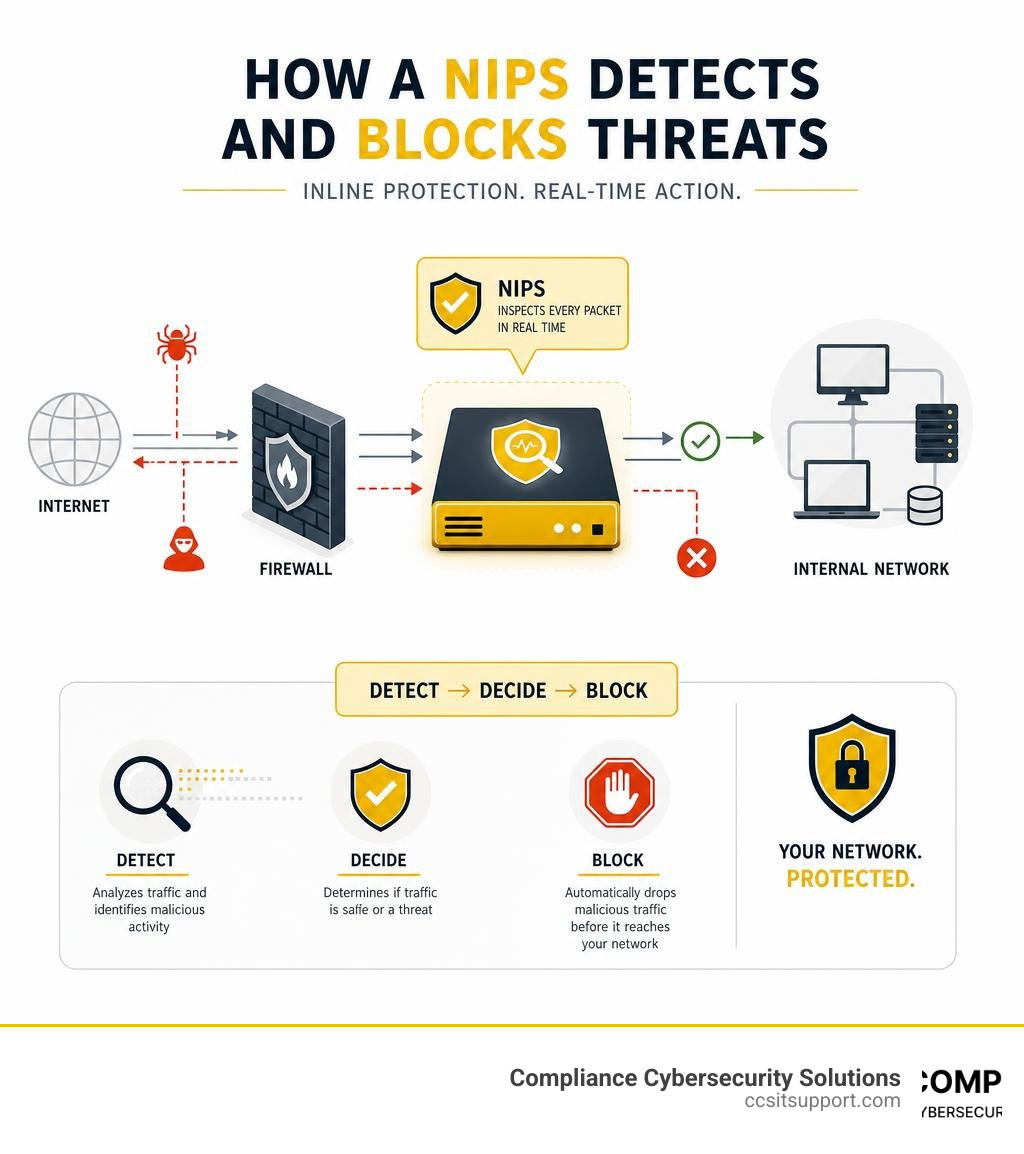
A network intrusion prevention system (NIPS) is a dedicated security appliance—either physical hardware or virtual software—placed directly in the path of your network traffic (inline). Its primary job is to continuously monitor a company's computer networks for unusual traffic patterns, generate event logs, alert system administrators to major incidents, and actively block any breaches when possible.
Unlike perimeter security tools that only look at packet headers (like basic firewalls), a NIPS performs deep packet inspection (DPI). It analyzes the data payload of packets across multiple layers of the Open Systems Interconnection (OSI) model, specifically from Layer 2 (Data Link) all the way up to Layer 7 (Application).
By operating inline, typically situated right behind your border router or firewall, the NIPS acts as a gatekeeper. Every single packet entering or leaving your protected network segment must pass through its inspection engine. If a packet matches a known exploit pattern or violates a preconfigured security policy, the NIPS instantly drops it, preventing it from ever reaching its destination. This active posture makes it a cornerstone of any Network Intrusion Detection System architecture that has evolved to include automated prevention.
NIPS vs. IDS: Active Prevention vs. Passive Detection
The difference between an Intrusion Detection System (IDS) and an Intrusion Prevention System (IPS) is the difference between a security camera and a security guard standing at the door.
An IDS is a passive monitoring system. It sits on a span port or network tap, receiving copies of network traffic. If it detects a SQL injection attempt, a Trojan beaconing out to a Command and Control (C2) server, or a brute-force attack, it writes an entry to a log and sends an alert to your IT team. However, the malicious packets still reach their target. By the time your security team reads the alert, the damage may already be done.
A NIPS, conversely, is an active prevention system. Because it is deployed inline, it does not inspect copies of packets; it inspects the actual live packets as they route through the network. If it identifies a threat, it doesn't just alert you—it modifies the network flow, drops the malicious packets, or terminates the TCP session entirely.
While this active enforcement provides immediate protection, it does introduce two main engineering trade-offs: latency and the risk of false positives. Because the NIPS must inspect traffic in real time, any delay in its processing engine can slow down your overall network speed. Furthermore, if a NIPS misidentifies a legitimate business application as a threat (a false positive), it will block that traffic, potentially interrupting critical operations.
Feature Intrusion Detection System (IDS) Network Intrusion Prevention System (NIPS) Deployment Mode Passive (out-of-band, uses TAP/SPAN ports) Active (inline, directly in the traffic flow) Primary Action Monitors, logs, and alerts Blocks, drops, alerts, and resets connections Network Latency Zero impact (inspects copies of traffic) Minor impact (must process live packets) Risk of False Positives Low operational impact (generates a false alert) High operational impact (can block legitimate business traffic) Evasion Vulnerability Higher (attackers can outrun passive logging) Lower (packets are reassembled and normalized inline)
How a NIPS Works to Detect and Prevent Threats in Real Time
To block threats without grinding your network to a halt, a NIPS relies on a highly optimized, multi-stage processing pipeline.
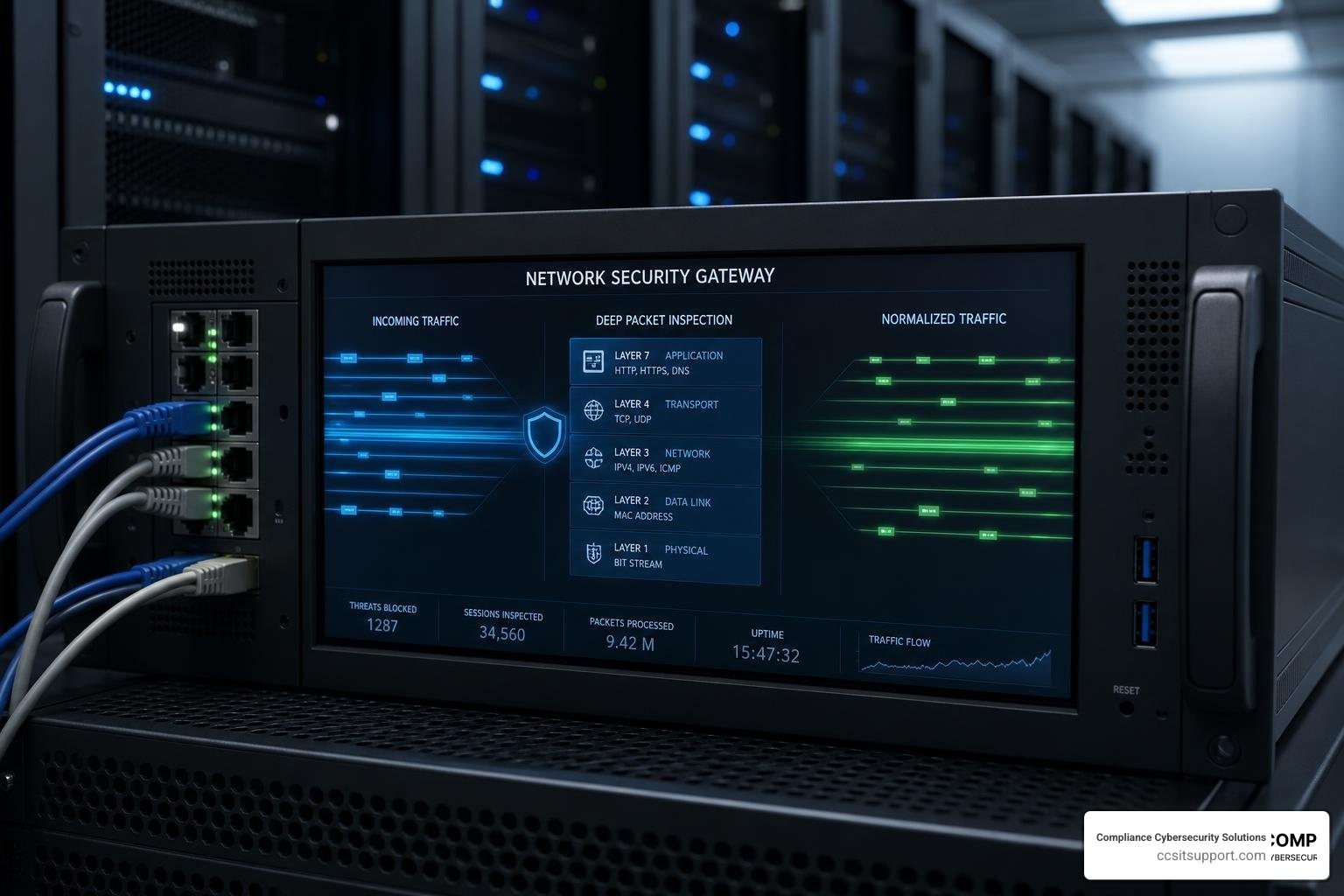
Inline Traffic Capture: Packets arrive at the physical or virtual interface of the NIPS.
Traffic Preprocessing and Normalization: Attackers often try to evade detection by fragmenting packets or manipulating TCP/IP protocols so that the security system sees one thing while the end host reconstructs another. To stop this, the NIPS performs full-stream reassembly. It reorganizes out-of-order packets, strips away protocol anomalies, and normalizes the traffic stream so it looks exactly like what the destination operating system will receive.
Layered Packet Inspection: The normalized stream is sent to the inspection engine. The engine decodes protocols (such as HTTP, SMB, FTP, or DNS) to understand the context of the communication.
Detection Engine Analysis: The engine evaluates the traffic against threat signatures, behavioral baselines, and security policies.
Mitigation Action: If a threat is identified, the system instantly executes configured rules—such as dropping the packet or resetting the connection—and forwards the log data to a syslog server or SIEM.
For technical teams looking to deploy this level of control on open-source routing platforms, the Intrusion Prevention System — OPNsense documentation provides an excellent blueprint. It details how the Netmap framework can be used to achieve wire-speed packet processing and automated blocking directly within your firewall appliance.
Detection Methods Used by a Network Intrusion Prevention System
Modern NIPS platforms do not rely on a single detection mechanism. Instead, they combine multiple inspection methodologies to catch both known exploits and sophisticated, evasive threats:
Signature-Based Detection: This method compares network traffic against a database of known threat "fingerprints" or signatures. It is highly effective and accurate at blocking known malware, trojans, and exploits with a very low rate of false positives. However, it is blind to zero-day attacks (threats for which no signature has been written yet).
Anomaly-Based Detection: Also known as behavior-based detection, this method establishes a baseline of "normal" network behavior (e.g., typical bandwidth usage, protocol mixes, and device communication patterns). If traffic deviates significantly from this baseline, the NIPS flags and blocks it. This is excellent for catching zero-day exploits and novel ransomware, though it requires careful tuning to prevent legitimate network changes from triggering false alarms.
Policy-Based Detection: This method allows administrators to write specific rules governing network use. For example, you can configure a policy that blocks any external SSH connections to your database segment, or prevents employees from using unauthorized peer-to-peer file-sharing protocols, regardless of whether the traffic is malicious.
Deep Learning and Heuristics: Next-generation NIPS solutions use inline artificial intelligence and machine learning models to analyze traffic patterns. By looking at structural characteristics of traffic rather than static signatures, deep learning can identify never-before-seen malicious traffic—such as polymorphic malware or covert Command and Control (C2) channels—in real time.
For organizations looking to implement a highly customizable, rule-based approach, Snort - Network Intrusion Detection & Prevention System stands as the global open-source standard. Its widely accepted rule formats allow security teams to quickly write and deploy custom signatures to defend against emerging vulnerabilities.
Automated Response Actions and Threat Mitigation
When a NIPS identifies a threat, it can execute several automated actions in milliseconds to mitigate the risk:
Dropping Packets: The system simply discards the malicious packets. The sender receives no response, causing the connection to time out.
Terminating Connections: For TCP connections, the NIPS can inject TCP Reset (RST) packets to both the source and destination, immediately tearing down the session.
Rate Limiting: If a host is sending an unusually high volume of traffic (such as a minor Denial of Service attempt), the NIPS can throttle its bandwidth allocation to protect network availability.
Dynamic Firewall Rules: The NIPS can communicate directly with your perimeter firewalls, instructing them to temporarily block the attacking IP address at the very edge of your network.
Honeypot Redirection: In highly secure environments, instead of dropping the connection, the NIPS can transparently redirect the attacker's traffic to a honeypot—a decoy system designed to safely monitor and analyze their techniques.
The Core Types of Intrusion Prevention Systems
While a NIPS is designed to protect the overall network fabric, it is most effective when deployed as part of Multi-Layered Security Solutions. To protect your entire digital footprint, it helps to understand the different types of IPS technologies available.
Here is how these systems typically align across your infrastructure:
Internet / WAN connects to your Firewall.
Behind the firewall sits the NIPS (Network-Based IPS), which inspects all raw network traffic.
From there, traffic flows to your internal segments:
Local LAN (where Network Behavior Analysis monitors flow behavior).
Wireless LAN (where Wireless IPS blocks rogue access points).
Servers and Hosts (where Host-Based IPS protects operating systems and files).
Host-Based, Wireless, and Network Behavior Analysis Alternatives
Depending on where you need protection, you may deploy one or more of these specialized IPS types:
Host-Based Intrusion Prevention System (HIPS): Installed directly on individual endpoints (like servers or workstations), a HIPS monitors internal operating system calls, file system modifications, and local registry changes. It is highly effective at stopping ransomware from encrypting local files, even if the malware bypassed your network defenses.
Wireless Intrusion Prevention System (WIPS): This system monitors the radio frequency spectrum for unauthorized wireless activity. It detects and blocks rogue access points, man-in-the-middle attacks over Wi-Fi, and wireless spoofing attempts.
Network Behavior Analysis (NBA): Rather than inspecting individual packets, NBA analyzes network flow data (like NetFlow or IPFIX) to spot unusual trends across the entire network. It is particularly useful for identifying internal lateral movement, data exfiltration, and distributed denial-of-service (DDoS) attacks.
Choosing the Right Network Intrusion Prevention System for Your Business
Selecting the right NIPS solution requires balancing security efficacy, operational complexity, and performance. When evaluating solutions, your technical team should focus on three critical capabilities:
Throughput Requirements: Your NIPS must be able to process traffic at wire speed. If your internet pipe is 10 Gbps, deploying a NIPS rated for only 5 Gbps will create a massive bottleneck.
Encrypted SSL/TLS Decryption: Since approximately 80% or more of network traffic consists of encrypted web applications, attackers frequently hide malware inside encrypted tunnels. Your NIPS must have the hardware acceleration required to decrypt, inspect, and re-encrypt traffic without degrading performance.
Cloud and SASE Integration: If your organization operates in a hybrid environment, look for a NIPS that integrates natively with cloud platforms (like AWS or Azure) and Secure Access State Edge (SASE) architectures to protect remote workers consistently.
To compare enterprise-grade options and see how peers rate top-performing systems, you can consult the Best Intrusion Detection and Prevention Systems Reviews 2026 .
For businesses operating locally in Florida, partnering with a specialized security provider can streamline your deployment. Working with local experts ensures your systems are configured correctly from day one, aligning your network defenses with both industry best practices and regional compliance requirements.
Key Benefits and Limitations of Deploying a NIPS
Deploying a NIPS offers clear security advantages, but it also comes with operational challenges that require ongoing management.
The Benefits:
Active Threat Prevention: It stops threats in real time before they can compromise your systems, significantly reducing the burden on your incident response team.
Virtual Patching: When a new software vulnerability (CVE) is discovered, it can take weeks or months for vendors to release a patch and for your IT team to test and deploy it. A NIPS can block exploits targeting that specific vulnerability immediately, giving you a secure "breathing room" window to apply the official software updates.
Regulatory Compliance: A NIPS is a critical tool for meeting strict security standards. For example, it directly satisfies the Payment Card Industry Data Security Standard (PCI-DSS) requirements for intrusion prevention, and helps satisfy access control and monitoring requirements under HIPAA and CMMC 2.0.
Enhanced Network Visibility: By logging and analyzing protocol behaviors, a NIPS provides deep insights into what applications are running on your network and who is using them.
The Limitations:
Risk of False Positives: If a rule is too aggressive, it can block legitimate business traffic, causing operational downtime.
Performance Overhead: Deep packet inspection requires significant processing power. If the NIPS is oversubscribed, it can introduce latency or packet drops.
Encrypted Traffic Blind Spots: Without dedicated SSL decryption policies and certificates in place, a NIPS cannot inspect the payload of encrypted traffic, leaving a blind spot for attackers to exploit.
To mitigate these limitations, many organizations choose to outsource the monitoring, tuning, and management of their systems to a specialized Managed Threat Detection Service. This ensures that rules are constantly updated and tuned by certified security analysts, minimizing false positives while maintaining maximum protection.
Integrating NIPS with Your Broader Security Ecosystem
A NIPS should never operate as an isolated island. To build a resilient security posture, it must seamlessly share data and orchestrate responses with the rest of your security stack:
Threat Intelligence: Feeds real-time IP and hash data directly into the NIPS Engine.
NIPS Engine: Inspects and filters traffic, communicating bidirectionally with your firewalls and SIEM.
Firewalls: Receive block commands from the NIPS to stop malicious IPs at the perimeter.
SIEM: Correlates NIPS alerts with broader network events to identify multi-stage campaigns.
When integrated with a Security Information and Event Management (SIEM) platform, NIPS alerts are correlated with log data from endpoints, active directory, and cloud services. This correlation helps security teams quickly identify if a blocked network attack was part of a larger, multi-stage campaign.
Furthermore, a NIPS should feed into your Threat Detection and Incident Response Services for Businesses. For instance, when the NIPS blocks a malicious payload, it can automatically share the attacking IP address with your firewalls to block it at the perimeter, while simultaneously notifying your endpoint security tools to scan for any hosts that may have interacted with that IP earlier.
If you are running a Cisco-centric branch network, you can learn how to deploy virtualized Snort engines directly inside your routing hardware by reviewing the Security and VPN Configuration Guide, Cisco IOS XE 17.x - Snort IPS [Cisco IOS XE 17] - Cisco . This integration allows you to run enterprise-grade intrusion prevention on your existing routers, saving on hardware costs while maintaining centralized control.
Frequently Asked Questions about Network Intrusion Prevention
How does a NIPS handle encrypted SSL/TLS traffic?
Because the vast majority of modern network traffic is encrypted, a NIPS must be configured to decrypt traffic to perform deep packet inspection. This is typically achieved by installing a trusted SSL decryption certificate on the NIPS.
When an internal user requests an external HTTPS website, the NIPS intercepts the connection, establishes a secure session with the external site, decrypts and inspects the payload, and then re-encrypts the traffic using its own certificate before sending it to the user.
To prevent performance bottlenecks during this process, modern platforms like the Intrusion Prevention System | Trellix utilize dedicated hardware acceleration chips and agent-based key sharing, allowing organizations to decrypt and inspect high-throughput SSL traffic without degrading network speeds.
What is virtual patching and how does it protect networks?
Virtual patching is a technique where a security rule is deployed on your NIPS to block exploits targeting a specific software vulnerability before the software itself is patched.
For example, if a critical vulnerability is announced for Microsoft Exchange, it may take your IT team days to schedule downtime and apply the official patch. During that window, attackers will actively scan the internet for unpatched systems. By enabling a virtual patch rule on your NIPS, the system will identify and drop any packets containing the exploit structure, effectively shielding your vulnerable server from attack.
Cloud-native solutions, such as the Intrusion Prevention System (IPS) | Cato Networks , handle this process autonomously. Their global security teams write, test, and deploy virtual patches across their cloud network within hours of a CVE release, protecting your infrastructure automatically without requiring any software updates or configuration changes on your end.
How do you minimize false positives in a NIPS deployment?
Minimizing false positives requires a structured approach to deployment and tuning:
Start in Detection-Only Mode: When first deploying a NIPS, run it in passive "IDS mode" for 2 to 4 weeks. This allows the system to log alerts without blocking any traffic, giving you a baseline of your network's normal behavior.
Identify and Disable Noisy Rules: Analyze the logs to find rules that trigger frequently on legitimate traffic. For instance, a custom internal database application might trigger a generic SQL injection rule. You can safely disable or write an exemption policy for that specific rule on that specific segment.
Customize Rulesets: Do not enable every signature in the database. Only enable signatures that correspond to the operating systems, applications, and protocols actually running on your network.
Conduct Regular Audits: Establish a routine Network Security Audit Program to review your NIPS policies, clean up outdated rules, and ensure your signature databases are updating correctly.
Conclusion
A network intrusion prevention system is no longer a luxury reserved for massive enterprises; it is a fundamental layer of defense for any organization handling sensitive data. By sitting inline and inspecting every packet, a NIPS stops ransomware, blocks zero-day exploits, and provides critical virtual patching that keeps your business secure during the dangerous window before software updates can be applied.
For businesses in regulated industries like healthcare, defense, and finance, a properly configured NIPS is also a key compliance enabler. It helps you satisfy the strict access control and real-time monitoring requirements of HIPAA, CMMC 2.0, and PCI-DSS.
At Compliance Cybersecurity Solutions, based in Fort Lauderdale, Florida, we specialize in aligning your IT infrastructure with complex compliance frameworks. We don't just sell tools; we design, deploy, and manage tailored security architectures that protect your business while keeping your network running at peak performance.
Don't wait for a breach to find out where your network's open doors are. Secure your business with our comprehensive Cybersecurity services today, and let us help you lock the digital doors for good.